Data tags (INS / DINS / UPD)
The data workhorses — tags that insert, update, and migrate parameter values across processes, commodities, regions, and years. Includes the plain forms, all the variants (-AT, -TS, -TSL), the topology-aware forms, and adjacent helpers (~TFM_MIG, ~TFM_FILL-R, ~TFM_INS-txt, ~TFM_GAMS).
The data workhorses
The TFM (Transformation) tags enable bulk insert or update of parameters in a rule-based manner - via technology/commodity filters that are based on set membership, shortname, description, and topology. It is also possible to include existing parameters (and their values) as filter criteria.
DINS, INS, and UPD Tables
Veda supports three main transformation table types for inputting data: DINS (Direct Insert), INS (Insert), and UPD (Update). Each serves a distinct purpose, with varying degrees of efficiency and complexity depending on the dataset's structure and the modeling requirements.
Important
The ~TFM_DINS tag offers the highest processing efficiency, followed by ~FI_T and ~TFM_INS.
Tags ~TFM_UPD and ~TFM_MIG are the least efficient. Whenever possible, users are encouraged to use DINS or INS, provided the logic can be transferred.
1. ~TFM_DINS (Transformation Direct Insert Tables)
Purpose: ~TFM_DINS is the preferred table type when the dataset is fully enumerated, meaning all fields are explicitly defined without any wildcards or comma-separated lists.
Key Characteristics:
- Processes are identified using only the
pset_pncolumn. - Commodities (if applicable) are defined explicitly via the
cset_cncolumn. - No wildcards (e.g.,
?,*) or comma-separated values are allowed.
Advantages:
- The most efficient tag.
Use Case: When all model elements are clearly defined in advance,
such as a process-specific bound (ACT_BND) applied to individual
processes without any rules.
2. ~TFM_INS (Transformation Insert Tables)
Purpose: INS is the general-purpose table for inserting new data into the database. It allows for greater flexibility in specifying model elements.
Key Characteristics:
- Supports wildcards (e.g.,
ALL,*) and comma-separated values in fields likepset_pnandcset_cn. - Inserts absolute values directly into the database without referencing existing seed data.
Advantages:
- Provides flexibility for users who work with less granular or generic data definitions.
- Easy to use for scenarios where exact enumeration is not required.

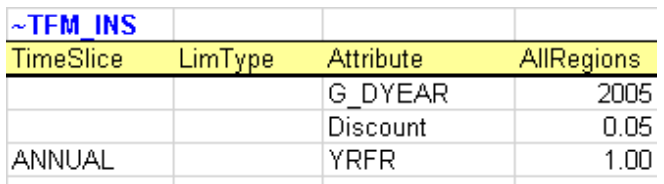
In this example from DemoS_001, it is used to declare three new attributes (G_DYEAR, Discount, and YRFR) by row.
3. ~TFM_UPD (Transformation Update Tables)
Purpose: UPD is used when data modifications depend on the presence of existing seed values in the database.
Key Characteristics:
- Performs numerical transformations on seed values (e.g., multiplying or dividing an existing value).
- Supports conditional insertion, where new data is added only if a corresponding seed value exists.
- Requires prior existence of seed data in an alphabetically inferior scenario in the database.
Advantages:
- Ensures data integrity by operating conditionally on existing entries.
- Enables dynamic adjustments of seed values without overwriting them.

In this figure it sets default prices (ACTCOST) for the backstop dummy processes for energy commodities (IMPZ - dummy IMPort processes ending with “Z”) and demands (IMPDEMZ - a dummy IMPDEMZ process that can feed any demand). Note that the process and attribute MUST already have been specified for the qualifying process. Though not shown in the example above the data specification field may also contain operators (+, , -, /) there the resulting value is applied to the existing value for the qualifying processes.
Note
UPDate and Replacing Data: UPDate is sometimes confused with
replacing data. Any of these tags will replace data if they exist in
BY_Trans or SubRES trans files and data for the same indexes has
been declared in the BY or SubRES files. Otherwise, they will simply
create new entries in the scenario where they exist. The "replacing"
will happen if this scenario file appears after the scenario with the
original data in the scenario group selected for the case.
Comparison of DINS, INS, and UPD
| Feature | DINS | INS | UPD |
|---|---|---|---|
| Data Enumeration | Fully enumerated | Supports wildcards/lists | Relies on existing data |
| Wildcards / Comma-Separated Values | Not allowed | Allowed | Allowed |
| Seed Data Requirement | Not required | Not required | Required |
| Primary Use Case | Explicit, enumerated data | Rule-based data insertion | Conditional modifications |
| Performance | Fastest | Moderate | Slowest |
Best Practices
- Use DINS wherever possible for maximum efficiency, especially when handling large datasets that are fully enumerated.
- Use INS for flexible data insertion when working with generic definitions or multiple entries defined using wildcards or lists.
- Use UPD sparingly, only for cases where transformations or conditional insertions are explicitly required, as it involves additional computational overhead.
By understanding the distinct roles and advantages of each table type, users can optimize their data preparation workflows and improve overall model performance.
Tip
By default, DINS, INS, and UPD tables use regions (or
Value/AllRegions) as the data value column headers. However, there are
scenarios where it is beneficial to organize data differently, such as:
1. Improving Table Readability: Wider tables with alternative column
headers can reduce data preprocessing and make data easier to interpret.
2. Enhancing Efficiency: Minimizing the number of rows in a table
reduces the processing overhead for rule application.
To support these needs, Veda provides several variants of DINS, INS, and UPD tables. These variants allow the user to specify attributes, years, or timeslices as value column headers.
~TFM_INS Variants
The ~TFM_INS variants offer flexible table layouts for inserting data. The following variants are available:
- TFM_INS-AT: The value fields use attributes as column headers.
- TFM_INS-TS: The value fields use years as column headers.
- TFM_INS-TSL: The value fields use timeslices as column headers.
~TFM_DINS Variants
The ~TFM_DINS variants allow fully enumerated data to use alternative column headers. The following variants are supported:
- TFM_DINS-AT: The value fields use attributes as column headers.
- TFM_DINS-TS: The value fields use years as column headers.
- TFM_DINS-TSL: The value fields use timeslices as column headers.
~TFM_UPD Variants
The ~TFM_UPD variants allow update tables to organize value fields differently. The supported variants include:
- TFM_UPD-AT: The value fields use attributes as column headers.
- TFM_UPD-TS: The value fields use years as column headers.
Example Table Layouts
~TFM_INS-TS Example — years as column headers
Real example from SubRES_H2-Production_Trans.xlsx :: misc.:
| ~TFM_INS-TS | pset_set | pset_ci | pset_co | pset_pn | attribute | oth_ind | commodity | 2020 | 2022 | 2030 | 0 | limtype |
|---|---|---|---|---|---|---|---|---|---|---|---|---|
| GASNGA | HH2 | *CCS |
FLO_EMIS | HH2CO2Ng | CO2Captured_sup | 0.9 | 0.95 | |||||
| BIOBSL | HH2 | *CCS |
FLO_EMIS | HH2CO2Nb | CO2Captured_ccu | 0.9 | 0.95 | |||||
| ELCCurt | HH2 | FLO_SHAR | ELC_gc | ELC | 0 | 3 | LO |
In this example:
- The value fields use years (
2020,2022,2030) as column headers. - The special
0column carries the default year value. attributeis supplied per-row (FLO_EMIS,FLO_SHAR); when every row uses the same attribute, it can be lifted to a header directive like~TFM_INS-TS:attribute=FLO_EMISinstead.limtype(LO,UP,FX) on the last row sets the limit type.
~TFM_INS-AT Example — attributes as column headers
Real example from Scen_RE-Targets_EMBER.xlsx :: RE outlook:
| ~TFM_INS-AT | pset_set | year | PRC_AOFF | START | region |
|---|---|---|---|---|---|
| E_Coal | 2040-EOH | 0 | Bangladesh,Indonesia,Malaysia,Philippines,Thailand,Vietnam | ||
| E_Coal | 2025 | Bangladesh,Indonesia,Malaysia,Philippines,Thailand,Vietnam |
In this example:
- The value fields use attribute names (
PRC_AOFF,START) as column headers — each row can write into one or more attributes simultaneously. pset_set = E_Coalrestricts the rows to coal-power processes; the comma-separatedregionlist applies the row to six regions.- The
-EOHsuffix on year2040means "to end of horizon."
Table-level region declarations. Multiple regions or region groups
(comma-separated) can be specified in table-level declarations for
~TFM_DINS-TS, ~TFM_INS-TS, and ~TFM_FILL-R tags. Example:
~TFM_INS-TS:Region=Reg_Dev,Reg_Eme; specifies Reg_Dev and
Reg_Eme as table-level region declarations.
Best Practices
- Choose Variants Wisely: Select a table variant that aligns with the structure of your source data to minimize preprocessing.
- Keep Tables Wide: Wider tables (fewer rows) are more efficient, as they reduce the rule processing required for each row.
- Simplify Preprocessing: Use the variant that closely matches your source data layout, reducing the need for manual restructuring.
- Fully Enumerate Data for DINS Variants: Ensure all data is fully enumerated (no wildcards or lists) when using DINS variants for optimal performance.
By leveraging these variants, users can efficiently configure their tables for improved readability and reduced computational overhead, while ensuring that data aligns seamlessly with Veda's processing structure.
~TFM_MIG
~TFM_MIG is one of the most powerful tags Veda offers. It migrates
existing data from one coordinate to another — copying or moving
parameter values from a source (attribute, process, commodity, region,
year, timeslice, currency, …) tuple to a destination tuple, optionally
rescaling the value along the way.
The "1 vs 2" column convention
Most filter columns come in two forms:
- Plain name (or
1suffix conceptually): identifies the source rows — the existing data to migrate from. Example:attribute,pset_pn,commodity,region,year,timeslice,currency,limtype,other_indexes. 2suffix: identifies the destination — what each axis becomes after migration. Example:attribute2,commodity2,currency2,limtype2,other_indexes2,year2,timeslice2,sow2,stage2.
Wherever you provide a 2-suffix value, that axis is overridden in
the migrated row. Where no 2 value is provided, the source axis is
preserved as-is.
Migratable axes
These are the axes that have both a source and a destination form. The left column matches existing rows; the right column overrides that axis in the migrated row.
| Source filter | Destination override | What it migrates |
| attribute | attribute2 | The TIMES parameter being rewritten |
| cset_cn (alias commodity) | commodity2 (alias cset_cn2) | Commodity |
| year / yr | year2 / yr2 | Year migration (e.g. project base-year data forward) |
| timeslice / ts | timeslice2 / ts2 | Timeslice migration |
| currency / curr | currency2 / curr2 | Currency migration (e.g. with rescaling) |
| limtype (aliases lim_type, bd) | limtype2 | Bound type migration (LO ↔ UP ↔ FX) |
| other_indexes (aliases other_ind, oth_ind) | other_indexes2 | Commodity group / aux index migration |
| sow | sow2 | State-of-the-world migration |
| stage | stage2 | Stage (multi-stage stochastic) |
Source-only filters
The remaining columns, including process, shape which existing rows the migration applies to, but have no corresponding destination form. They participate as filter inputs only.
Value column (the migrated number): value (aliases valfield,
val_field, allregions):
- A bare number replaces the source value entirely.
- A leading
*makes it a multiplier (*1keeps the value,*0.5halves it,*0.062rescales by that factor). - Leaving it blank keeps the source value.
val_cond filters the source by its current value — only rows whose
existing number matches the condition are migrated. Examples: >1,
<.001, =0.
What this lets you do
Some patterns this enables:
| Pattern | Source / destination columns to use |
| Re-attribute a value (write the same numbers under a different attribute) | attribute → attribute2 |
| --- | --- |
| Project a base-year value forward to a target year | year (source) → year2 (target), value can be a multiplier |
| --- | --- |
| Shift values between regions | region (source) and a paired destination row |
| Re-classify a commodity (move data from COA1 to COA2) | commodity → commodity2 |
| Convert currency | currency → currency2 with value = *<rate> |
| Switch bound type (e.g. an LO becomes a FX) | limtype → limtype2 |
| Conditional clamp (only act on rows whose value exceeds a threshold) | val_cond plus a value override |
| --- | --- |
| Time-slice retiming | timeslice → timeslice2 |
| Move data between scenarios in stochastic mode | sow → sow2, stage → stage2 |
Real example 1 — Conditional clamp
From BY_Trans.xlsx :: Misc. Wherever the stock attribute currently
exceeds 1 for processes whose commodity-in matches certain renewable /
solar-thermal / heat patterns, write that value as the year-2100 value
(unchanged: *1):
| ~TFM_MIG: attribute=stock | year2 | Val_Cond | value | pset_ci |
|---|---|---|---|---|
| 2100 | >1 | *1 |
???GEO,???STH,???HET |
The header directive attribute=stock lifts the source attribute out
of the column list (so every row applies to stock). The migration
keeps the value (*1) but moves it to a target year (year2 = 2100)
under the original commodity-in filter.
Real example 2 — Re-scaling and re-yearing in one row
From BY_Trans.xlsx :: Transport. Take the PASTI attribute on
trade-related transport processes (Trd[_]*) in any region, scale it
down by the factor 0.062, and write it to year 2019:
| ~TFM_MIG | attribute | pset_pn | year2 | allregions |
|---|---|---|---|---|
| PASTI | Trd[_]* |
2019 | *0.0620343872322709 |
Here allregions is being used as the value column (one of its
aliases). The source year is unfiltered (so all source years match);
each match is multiplied by ~0.062 and written as year-2019 data.
When to reach for ~TFM_MIG
Because ~TFM_MIG can change almost any axis of an existing parameter
value while preserving filters on the others, it's the right tool when:
- The same numbers need to appear under a different name, year, region, currency, or limit type.
- A scenario rescales a whole family of values by a multiplier.
- Conditional rewrites are needed (only act on rows whose current value meets a threshold).
- The cleanest expression of the change is "wherever X was true, also
do Y" rather than enumerating Y from scratch via
~TFM_INS/~TFM_DINS.
For a pure overwrite that doesn't depend on existing data, prefer
~TFM_INS / ~TFM_DINS. For rule-driven scaling of values that does
depend on existing data, ~TFM_MIG is the cleanest path.
Cell content rules
The two halves of a ~TFM_MIG row obey different parsing conventions:
Source filter columns (no 2 suffix — attribute, pset_*,
cset_*, region, year, timeslice, currency, limtype,
other_indexes, …) accept the full filter grammar Veda uses in
~TFM_INS:
- Wildcards
*,?, and[_]for literal underscores. - Comma-separated lists (e.g.
pset_set = ELE,CHP). - Negative-match prefix
-(e.g.pset_pn = -ElcAgg*to exclude). - The
c_pos_andor/c_neg_andor/t_pos_andor/t_neg_andorconnectors (and their_forsetsvariants) for AND vs. OR semantics. - Set-membership filters via
pset_set/cset_set. - For the
yearcolumn only: a<from>-<to>range (e.g.2020-2050orBOH-EOH) auto-populatesyear2. A comma in the sourceyeardisables this range parsing — use commas only when you want a literal list of source years and a separateyear2column for the destination.
Destination columns (2 suffix — attribute2, year2,
currency2, limtype2, other_indexes2, timeslice2, sow2,
stage2) accept a much narrower vocabulary:
- Comma-separated lists are allowed (the cell is parsed via
csv_to_table, soattribute2 = NCAP_BND,ACT_BNDwrites two destination attributes). - Wildcards are not expanded —
*or?in a*2cell are treated as literal characters and will fail to match. Destination values must be enumerated literally. - Set membership and the
andorconnectors do not apply to most destination columns — they only filter the source side.
The one exception is commodity2: it goes through Veda's full
SNT-filter machinery, so it can accept set names, wildcards, and the
c_*_andor source-side connectors when resolving which destination
commodity each row writes to.
The value (alias valfield, val_field, allregions) column:
- A bare number replaces the source value entirely (e.g.
value = 1.5writes 1.5 wherever the row matches). - A leading
*makes it a multiplier on the existing source value (e.g.value = *0.5halves whatever was there). - Blank means "keep the source value unchanged" — useful in combination with destination overrides on year, region, attribute, etc., to migrate values without rescaling them.
~TFM_FILL-R
The "fill rules" tag is a wide-data importer: when source numbers
live in a separate Excel table with one column per year (or region, or
scenario), use ~TFM_FILL-R to translate that wide layout into the
long-format rows that Veda's internal tables expect.
Two directives are placed on the tag-header line itself, separated by
;:
w=<worksheet>— the worksheet whose columns hold the actual values to be filled in. Lowercase.hcol=<dimension>— the dimension that the column headers of that worksheet represent. Lowercase. Common values:region,year.
Real example from SubRES_Transport_trans.xlsx :: Road transport:
| ~TFM_FILL-R: w=RoadTra_BY; hcol=region | Scenario | Attribute | PSET_CO | AllRegions |
|---|---|---|---|---|
| BASE | AF | Trd[_]* |
*1 |
|
| BASE | EFF | Trd[_]* |
*1 |
The w=RoadTra_BY directive points at a separate sheet whose columns
are region names; hcol=region tells Veda to read each column header
as a region. Each row in the rules table specifies one (attribute,
process filter, value) tuple to fill across regions.
Recent updates:
- 4.3.3.0 — Fixed an issue in
~TFM_FILL-Rprocessing for Regular vs. Parametric scenarios. - 4.3.2.1 — Extended RegionGroup support so the column header in the data worksheet can be a RegionGroup name.
~TFM_Fill (without the -R) is the legacy version and should not be
used in new work.
Topology-aware INS/DINS
These tags are filtered variants of ~TFM_INS and ~TFM_DINS that
restrict their effect to (process, commodity) combinations that
actually appear in the model's topology — i.e. pairs where the
process really does consume or produce the commodity.
~TFM_TOPINS
Topology-aware INSert. Supports the same process and commodity filter
columns as ~TFM_INS, plus an io column that constrains the side
of the topology flow.
Real example from BY_Trans.xlsx :: IND2:
| ~TFM_TOPINS | pset_ci | pset_co | pset_pn | commodity | io |
|---|---|---|---|---|---|
| INDNGA | INDELC | EA* | INDBFG | IN |
The io column takes IN (commodity-in side) or OUT
(commodity-out side), letting the rule target one side of the
process-commodity relationship.
~TFM_TOPINS-A
Attribute-form of ~TFM_TOPINS. The columns are reduced to process,
commodity, value. Real example from
BY_Trans.xlsx :: pumped hydro:
| ~TFM_TOPINS-A | process | commodity | value |
|---|---|---|---|
| EP_HPS* | AuxStoOUT | OUT |
~TFM_TOPDINS
Topology-aware Direct INSert. Like ~TFM_DINS, the row enumerates
specific process and commodity names (pset_pn / cset_cn) rather
than using filters or sets. The topology check is still applied — rows
that name a (process, commodity) pair that isn't in the topology are
dropped silently.
Note
~TFM_TOPINS* and ~TFM_TOPDINS are processed after ~TFM_INS /
~TFM_DINS so they can rely on the topology those tags have
populated. A fix in the 4.2.x line ensured topology-tag rows that
depend on each other are processed in dependency order.
~TFM_INS-txt
Works exactly like the INS tag, but supports text values for the following Veda attributes that can be used to override values that come from the original process/commodity definition tables: PRC_PCG, PRC_TSL, PRC_VINT, COM_LIM, COM_TSL, COM_TYPE.
INS / DINS / UPD variants
Plain ~TFM_INS, ~TFM_DINS, and ~TFM_UPD cover the most common
cases: parameter values row-by-row, with optional process/commodity
filters and year/timeslice column headers. The suffixed variants
handle data layouts the plain forms can't express compactly.
The suffix conventions, derived from real model usage:
| Suffix | Meaning |
|---|---|
-AT |
"Attributes as columns" — each column header is itself an attribute name; one row touches multiple attributes at once. |
-TS |
"Time-series columns" — year values are column headers (e.g. 2020, 2025, 2030); each row supplies a time series. |
-TSL |
"Time-slice columns" — timeslice values are column headers; each row supplies one value per timeslice. |
Many variants use the same header-directive syntax as ~TFM_FILL-R:
~TFM_INS-TS:attribute=FLO_MARK, ~TFM_DINS-TS:attribute=COM_BNDPRD;LimType=LO.
~TFM_INS-TS
INS with a time-series column layout. A header directive can fix the
attribute for the whole table.
Real example from SubRES_H2-Production_Trans.xlsx :: misc.:
| ~TFM_INS-TS | pset_set | pset_ci | pset_co | pset_pn | attribute | oth_ind | commodity | 2020 | 2022 | 2030 | 0 | limtype |
|---|---|---|---|---|---|---|---|---|---|---|---|---|
| GASNGA | HH2 | *CCS |
FLO_EMIS | HH2CO2Ng | CO2Captured_sup | 0.9 | 0.95 | |||||
| BIOBSL | HH2 | *CCS |
FLO_EMIS | HH2CO2Nb | CO2Captured_ccu | 0.9 | 0.95 | |||||
| ELCCurt | HH2 | FLO_SHAR | ELC_gc | ELC | 0 | 3 | LO |
Years are columns; the special 0 column carries the default year
value. limtype (LO/UP/FX) is the limit type for the row. The same
table can mix multiple attributes — supplied per-row in the
attribute column — or be locked to one attribute via the header
directive.
~TFM_INS-AT
INS with attributes as column headers. Each row identifies a filtered set of processes/commodities, and writes one value into each attribute column.
Real example from Scen_RE-Targets_EMBER.xlsx :: RE outlook:
| ~TFM_INS-AT | pset_set | year | PRC_AOFF | START | region |
|---|---|---|---|---|---|
| E_Coal | 2040-EOH | 0 | Bangladesh,Indonesia,Malaysia,Philippines,Thailand,Vietnam | ||
| E_Coal | 2025 | Bangladesh,Indonesia,Malaysia,Philippines,Thailand,Vietnam |
Here PRC_AOFF and START are both column headers (i.e. attributes
to be written), and the row writes a value into one or both for the
matched processes. The year column applies a temporal range; the
region column is a CSV list. The -EOH suffix on 2040 means "to
end of horizon."
~TFM_INS-TSL
INS with a time-slice column layout. Each column header is a timeslice; the row writes the same attribute across all listed timeslices.
~TFM_DINS-TS
Fully-enumerated INS-TS — the row identifies a specific (process, commodity) pair directly rather than via filters.
Real example from Scen_Base-Industry.xlsx :: com_bndprd, with the
attribute and limit type fixed in the header:
| ~TFM_DINS-TS:attribute=COM_BNDPRD;LimType=LO | Commodity | Region | 2019 | 2020 | 2021 | … | 2030 | 0 |
|---|---|---|---|---|---|---|---|---|
| pc_2eh | Asia_Dev | 0.374 | 0.293 | 0.281 | … | 0.311 | 5 | |
| pc_2eh | Asia_Em | 0.037 | 0.033 | 0.035 | … | 0.048 | 5 | |
| pc_2eh | Belgium | 0.041 | 0.037 | 0.037 | … | 0.054 | 5 |
The 0 column again carries the default-year value; the header
directive locks the whole table to COM_BNDPRD as a lower bound.
~TFM_DINS-AT
DINS with an attribute-as-columns layout. Each row enumerates one (process, commodity) pair and writes values into one or more attribute columns.
~TFM_DINS-TSL
DINS with a time-slice column layout. Fully-enumerated equivalent of
~TFM_INS-TSL.
~TFM_UPD-T
UPD with a time-series column layout — applies updates to existing values for the years declared as column headers.
~TFM_UPD-TS
UPD with a year-series layout, supporting per-year overrides on
existing data (versus -T, which targets specific points).
~TFM_UPD-AT
UPD with attributes-as-columns. Updates multiple attributes for the same matched processes in a single row.
GAMS code injection
~TFM_GAMS
Lets the user inject custom GAMS code into the generated TIMES run. The row holds the snippet to be written; Veda copies it through to the run file at the appropriate point. Accepted in BY_Trans, SR_Trans, SysSettings, RegScen, TradeScen, SubParScen, and NoSeedValueScenario.
Largely superseded
For most cases that previously required ~TFM_GAMS, the
RFCmd family of attributes now provides a structured
alternative that does not require hand-written GAMS. Prefer RFCmd
attributes for new work.